ESP32-CAM RC Car with Live Video
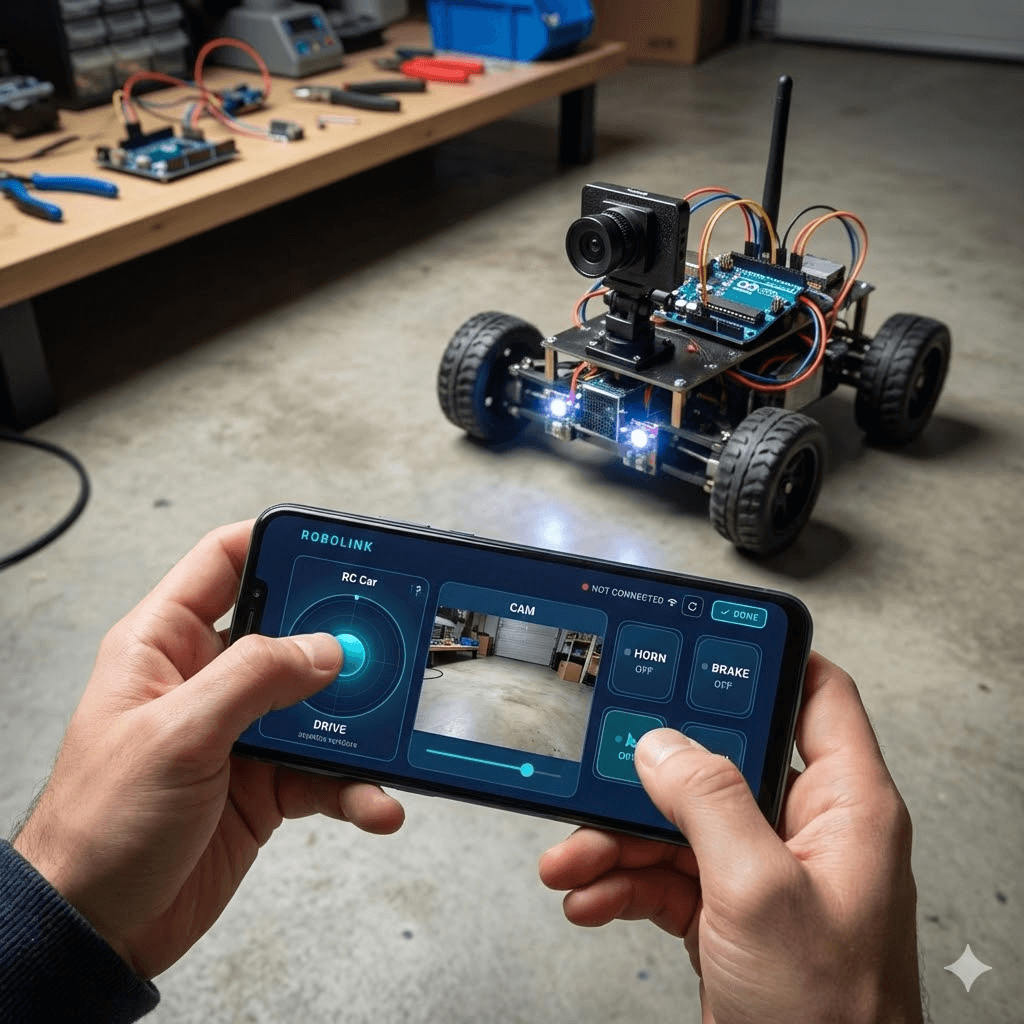
Video Demo
ESP32-CAM RC Car with Live Video video tutorial
Overview
This tutorial builds a 4-direction RC car using an AI-Thinker ESP32-CAM board. The phone drives the car over WiFi UDP while a live MJPEG video stream plays inside the RoboLink Camera widget — all running simultaneously on the same board.
Hardware Required
- AI-Thinker ESP32-CAM board
- L298N dual H-bridge motor driver
- 2 × DC gear motors (or 4 tied in pairs)
- 7–12 V battery pack for motors
- 5 V supply or regulator for ESP32-CAM
- Jumper wires
Wiring
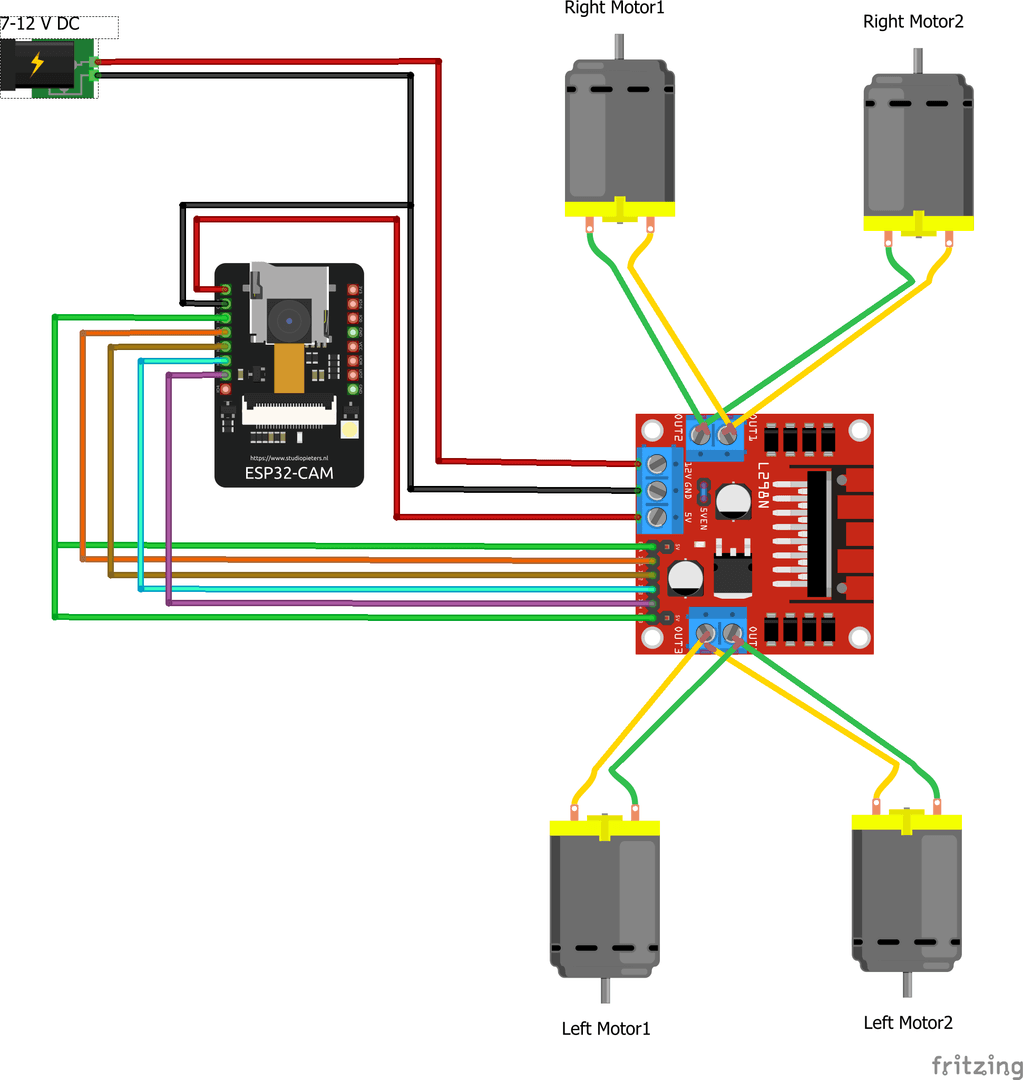
ESP32-CAM to L298N wiring diagram
| ESP32-CAM Pin | L298N Pin | Notes |
|---|---|---|
| GPIO 12 | ENA + ENB (tied) | Single PWM speed pin |
| GPIO 13 | IN1 | Right motors forward |
| GPIO 15 | IN2 | Right motors backward |
| GPIO 14 | IN3 | Left motors forward |
| GPIO 2 | IN4 | Left motors backward |
Do not use GPIO 4 for motor control. On AI-Thinker ESP32-CAM boards GPIO 4 drives the onboard flash LED and is also used by the camera — reassigning it will corrupt the video stream.
Tie ENA and ENB together on the L298N and connect both to GPIO 12. This lets you control overall speed with a single PWM pin, freeing the remaining GPIOs for the camera.
App Setup
Configure the RoboLink app before uploading the sketch:
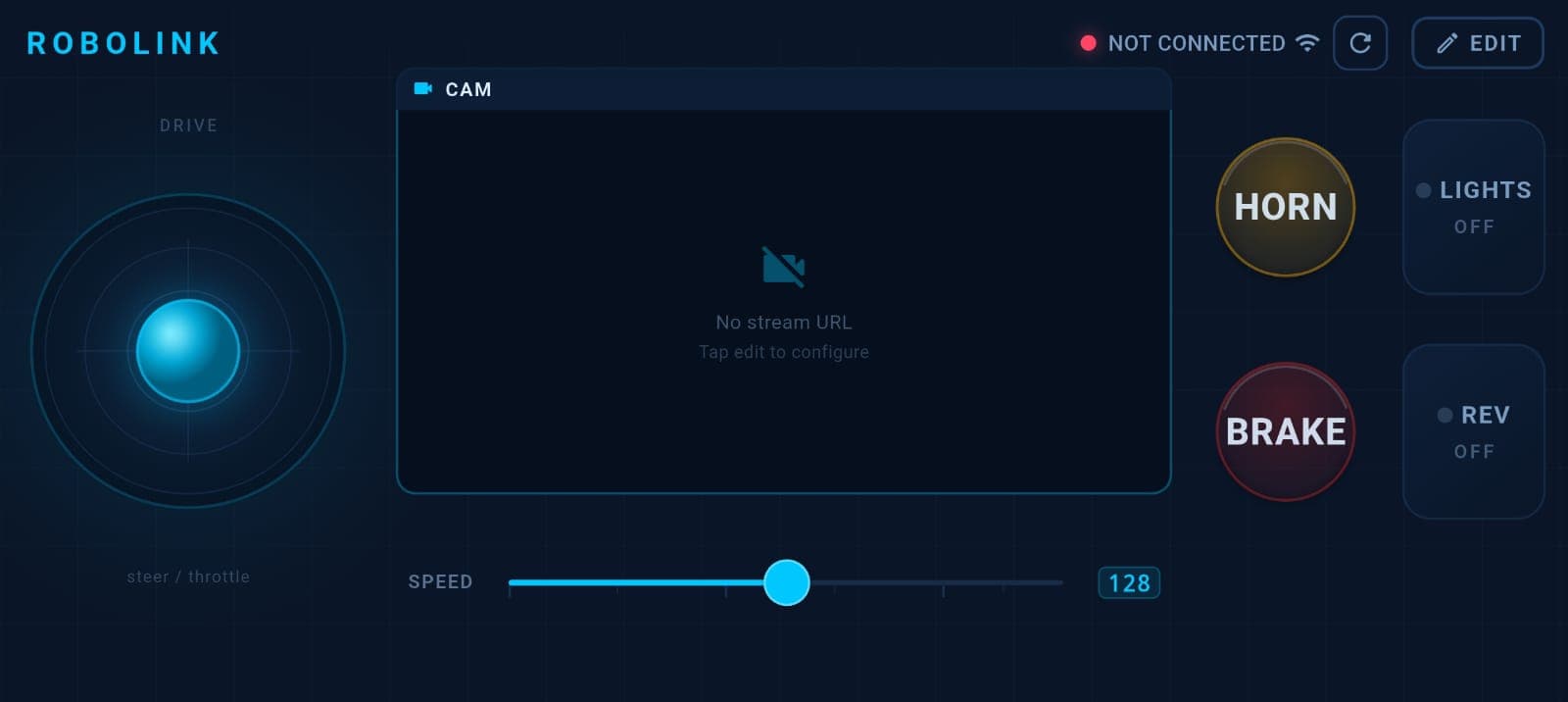
RoboLink app layout for ESP32-CAM RC car
- Open RoboLink → tap Edit Layout.
- Add a Joystick widget → set X key to
steer, Y key tothrottle. - Add a Camera widget → set the URL to
http://192.168.4.1:81/stream. - Optionally add a Gauge widget → set key to
uptimeto watch the ESP32 uptime. - Save the layout.
192.168.4.1 is always the ESP32's IP when it runs as an Access Point. Port 81 is where the MJPEG stream server listens as configured in the sketch.
The Sketch
Upload this to your ESP32-CAM using the AI Thinker ESP32-CAM board definition in Arduino IDE.
#include <RoboLink.h>
#include "esp_camera.h"
#include <WiFi.h>

const char* WIFI_SSID     = "RoboLink_CAM";
const char* WIFI_PASSWORD = "12345678";

// Motor pins (L298N)
const int SPEED_PIN = 12;   // ENA + ENB tied together
const int IN1 = 13;         // Right motors forward
const int IN2 = 15;         // Right motors backward
const int IN3 = 14;         // Left motors forward
const int IN4 =  2;         // Left motors backward

// Camera pin map — AI-Thinker ESP32-CAM
#define PWDN_GPIO_NUM  32
#define RESET_GPIO_NUM -1
#define XCLK_GPIO_NUM   0
#define SIOD_GPIO_NUM  26
#define SIOC_GPIO_NUM  27
#define Y9_GPIO_NUM    35
#define Y8_GPIO_NUM    34
#define Y7_GPIO_NUM    39
#define Y6_GPIO_NUM    36
#define Y5_GPIO_NUM    21
#define Y4_GPIO_NUM    19
#define Y3_GPIO_NUM    18
#define Y2_GPIO_NUM     5
#define VSYNC_GPIO_NUM 25
#define HREF_GPIO_NUM  23
#define PCLK_GPIO_NUM  22

#define STREAM_PORT 81

RoboLinkWiFi robolink;

// ── Motor helpers ──────────────────────────────────────────────────────
void motorForward(int spd)  { analogWrite(SPEED_PIN, spd); digitalWrite(IN1,HIGH); digitalWrite(IN2,LOW);  digitalWrite(IN3,HIGH); digitalWrite(IN4,LOW);  }
void motorBackward(int spd) { analogWrite(SPEED_PIN, spd); digitalWrite(IN1,LOW);  digitalWrite(IN2,HIGH); digitalWrite(IN3,LOW);  digitalWrite(IN4,HIGH); }
void motorLeft(int spd)     { analogWrite(SPEED_PIN, spd); digitalWrite(IN1,HIGH); digitalWrite(IN2,LOW);  digitalWrite(IN3,LOW);  digitalWrite(IN4,HIGH); }
void motorRight(int spd)    { analogWrite(SPEED_PIN, spd); digitalWrite(IN1,LOW);  digitalWrite(IN2,HIGH); digitalWrite(IN3,HIGH); digitalWrite(IN4,LOW);  }
void motorStop()            { analogWrite(SPEED_PIN, 0);   digitalWrite(IN1,LOW);  digitalWrite(IN2,LOW);  digitalWrite(IN3,LOW);  digitalWrite(IN4,LOW);  }

// ── MJPEG stream task (runs on Core 0) ────────────────────────────────
static const char* BOUNDARY = "\r\n--frame\r\n";
static const char* PART_HDR = "Content-Type: image/jpeg\r\nContent-Length: %u\r\n\r\n";

void streamTask(void*) {
    WiFiServer server(STREAM_PORT);
    server.begin();
    for (;;) {
        WiFiClient client = server.available();
        if (!client) { vTaskDelay(10); continue; }
        unsigned long t = millis();
        while (client.connected() && !client.available() && millis()-t < 3000) vTaskDelay(1);
        while (client.available()) client.read();
        client.println("HTTP/1.1 200 OK");
        client.println("Content-Type: multipart/x-mixed-replace; boundary=frame");
        client.println("Access-Control-Allow-Origin: *");
        client.println();
        while (client.connected()) {
            camera_fb_t* fb= esp_camera_fb_get();
            if (!fb) { vTaskDelay(100); continue; }
            char hdr[64]; snprintf(hdr, sizeof(hdr), PART_HDR, fb->len);
            client.print(BOUNDARY); client.print(hdr); client.write(fb->buf, fb->len);
            esp_camera_fb_return(fb);
            vTaskDelay(1);
        }
    }
}

// ── Camera init ────────────────────────────────────────────────────────
bool initCamera() {
    camera_config_t cfg = {};
    cfg.ledc_channel = LEDC_CHANNEL_0; cfg.ledc_timer = LEDC_TIMER_0;
    cfg.pin_d0=Y2_GPIO_NUM; cfg.pin_d1=Y3_GPIO_NUM; cfg.pin_d2=Y4_GPIO_NUM;
    cfg.pin_d3=Y5_GPIO_NUM; cfg.pin_d4=Y6_GPIO_NUM; cfg.pin_d5=Y7_GPIO_NUM;
    cfg.pin_d6=Y8_GPIO_NUM; cfg.pin_d7=Y9_GPIO_NUM;
    cfg.pin_xclk=XCLK_GPIO_NUM; cfg.pin_pclk=PCLK_GPIO_NUM;
    cfg.pin_vsync=VSYNC_GPIO_NUM; cfg.pin_href=HREF_GPIO_NUM;
    cfg.pin_sccb_sda=SIOD_GPIO_NUM; cfg.pin_sccb_scl=SIOC_GPIO_NUM;
    cfg.pin_pwdn=PWDN_GPIO_NUM; cfg.pin_reset=RESET_GPIO_NUM;
    cfg.xclk_freq_hz=20000000; cfg.pixel_format=PIXFORMAT_JPEG;
    cfg.grab_mode=CAMERA_GRAB_LATEST;
    if (psramFound()) { cfg.frame_size=FRAMESIZE_VGA;  cfg.jpeg_quality=12; cfg.fb_count=2; }
    else              { cfg.frame_size=FRAMESIZE_QVGA; cfg.jpeg_quality=15; cfg.fb_count=1; }
    return esp_camera_init(&cfg) == ESP_OK;
}

void setup() {
    Serial.begin(115200);
    pinMode(SPEED_PIN,OUTPUT);
    pinMode(IN1,OUTPUT); pinMode(IN2,OUTPUT);
    pinMode(IN3,OUTPUT); pinMode(IN4,OUTPUT);
    motorStop();

    if (!initCamera()) Serial.println("Camera init failed — no video.");

    robolink.beginAP(WIFI_SSID, WIFI_PASSWORD);
    Serial.print("Stream: http://"); Serial.print(robolink.localIP()); Serial.println(":81/stream");

    xTaskCreatePinnedToCore(streamTask, "mjpeg", 4096, NULL, 1, NULL, 0);

    robolink.setTimeoutMs(500);
    robolink.setSendInterval(200);
}

void loop() {
    robolink.update();

    int throt = robolink.get("throttle");  // -100 to +100
    int steer = robolink.get("steer");     // -100 to +100

    if (robolink.isTimedOut() || !robolink.hasReceivedData()) { motorStop(); return; }

    // Whichever axis is pushed harder wins
    if (abs(throt) >= abs(steer)) {
        if      (throt >  10) motorForward (map(throt,  0, 100, 0, 255));
        else if (throt < -10) motorBackward(map(-throt, 0, 100, 0, 255));
        else motorStop();
    } else {
        if      (steer >  10) motorRight(map(steer,  0, 100, 0, 255));
        else if (steer < -10) motorLeft (map(-steer, 0, 100, 0, 255));
        else motorStop();
    }

    robolink.setSensor("uptime", (int)(millis() / 1000));
}
How It Works
Dual-core streaming
The MJPEG server runs on Core 0 via xTaskCreatePinnedToCore. The motor control and UDP receive loop runs on Core 1 (the default Arduino loop()). The two never block each other, so video stays smooth even when the joystick is moving fast.
Motor direction logic
The joystick sends throttle (forward/backward) and steer (left/right) continuously. The sketch compares their absolute values and executes whichever is pushed harder — a simple 4-direction model that works well for basic navigation.
Safety stop
setTimeoutMs(500) guarantees the motors stop if the phone disconnects or the WiFi drops for more than 500 ms. Always include this in any motor-driving project.
Troubleshooting
| Symptom | Fix |
|---|---|
| Camera init failed in Serial Monitor | Check that you selected AI Thinker ESP32-CAM as the board in Arduino IDE |
| Video stream doesn't appear in app | Confirm Camera widget URL is exactly http://192.168.4.1:81/stream |
| Motors don't move but stream works | Verify L298N wiring matches the GPIO table above; check 12 V motor supply |
| GPIO 4 causes garbled video | Do not connect anything to GPIO 4 — it is shared with the camera flash LED |
| Choppy or frozen video | Switch to QVGA (320×240) by removing the psramFound() block and hardcoding FRAMESIZE_QVGA |
Next Steps
- Add a speed slider widget (key
speed, range 0–255) and replace the hardcodedmap()withrobolink.get("speed")for variable top speed. - Add a Toggle widget (key
lights) and wire GPIO 4 to an external LED (not the onboard flash) if your board variant exposes it safely. - Explore the Sensor data tutorial to display battery voltage alongside the uptime gauge.